Integrate Compass with other tools
Compass can be used interactively, as a producer of versioned JSON, through an MCP service, or as an exporter to graph systems. This guide focuses on stable…
Integrate Compass with other tools
Compass can be used interactively, as a producer of versioned JSON, through an MCP service, or as an exporter to graph systems. This guide focuses on stable boundaries and failure-safe consumption.
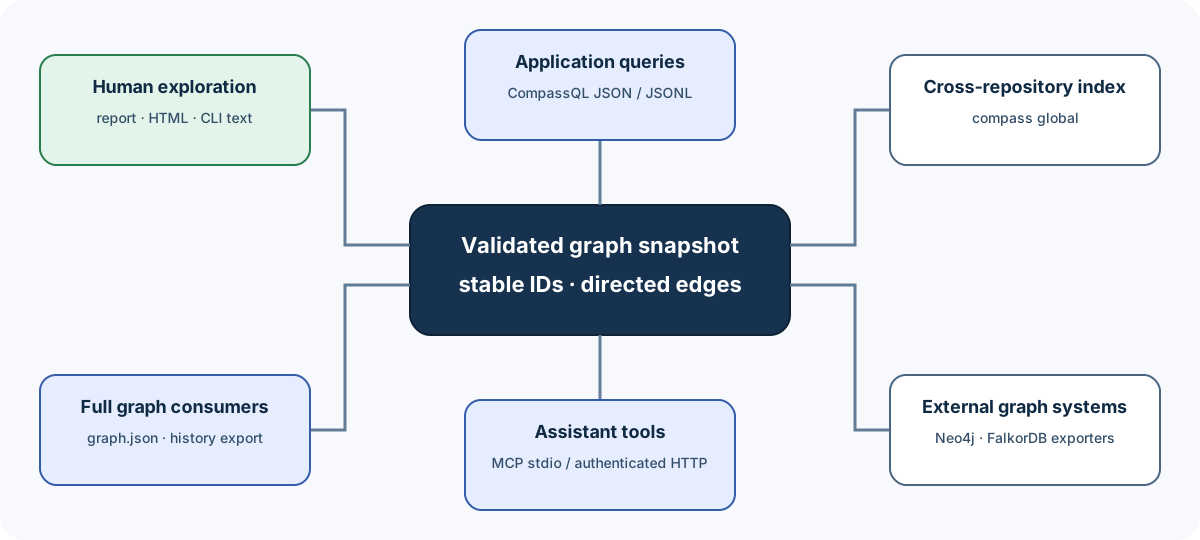
Choose the narrowest stable surface
| Integration need | Recommended surface |
|---|---|
| Human exploration | CLI text, report, HTML |
| Scripted exact graph pattern | CompassQL JSON or JSONL |
| Full graph processing | compass-out/graph.json |
| Historical reproducibility | History graph-json or compass-out export |
| Coding-assistant tool calls | compass serve / MCP |
| Cross-repository graph lookup | compass global |
| External graph database | compass export and configured target |
| Compare revisions | compass diff --format json |
| Review a pull request | compass review --format json or the reusable Action |
Human text is optimized for clarity and can evolve. Machine consumers should prefer explicitly versioned JSON or documented graph schemas.
Integration pattern: produce, validate, publish, consume
Treat a graph build as a producer job:
source checkout
    |
    v
compass update/extract
    |
    +-- failure --> keep prior published consumer state
    |
    `-- success --> validate expected artifacts
                         |
                         v
                  hand snapshot to consumer
Run the producer to completion before a consumer opens the result:
compass update .
test -s compass-out/graph.json
Do not infer success from a partially written log or the mere existence of an
old graph.json. Check the command exit status.
Use CompassQL for application-shaped data
A focused query reduces transfer and decouples the consumer from unrelated graph attributes:
compass query --cql \
  'MATCH (caller)-[edge:CALLS]->(target)
   WHERE target.label = $target
   RETURN caller.id, edge.confidence, target.id
   ORDER BY caller.id' \
  --param target=authorize \
  --format json \
  --output target/authorize-callers.json
The JSON result uses compass.cql.result/1. Validate the major version before
reading columns or typed values.
Prefer parameters
Do not build query text by concatenating a label:
unsafe and fragile:
  "WHERE n.label = '" + user_value + "'"
Pass it as data:
compass query --cql --file queries/find-label.cypher \
  --param target="$TARGET_LABEL" \
  --format json
This protects query structure and preserves parameter typing.
JSON versus JSONL
Use JSON when:
- results are modest;
- one complete document is convenient;
- plan/profile metadata belongs beside rows.
Use JSONL when:
- a streaming pipeline consumes rows one at a time;
- line-oriented tools are convenient;
- you still validate the
compass.cql.jsonl/1header and final summary.
An execution error does not represent a valid truncated result.
Use explicit limits
An integration should set budgets that match its job:
compass query --cql --file queries/dependencies.cypher \
  --format json \
  --timeout-ms 3000 \
  --max-rows 5000 \
  --max-path-depth 8 \
  --max-expanded-relationships 1000000 \
  --max-memory-bytes 134217728
On a limit error:
- do not interpret it as zero matches;
- narrow labels, relation types, or path bounds;
- partition the query by subsystem or file type;
- decide deliberately whether a larger resource budget is safe.
Consume the full graph
compass-out/graph.json uses NetworkX-style node-link data:
{
  "directed": true,
  "multigraph": true,
  "graph": {},
  "nodes": [
    {"id": "opaque-id", "label": "display name"}
  ],
  "links": [
    {
      "source": "opaque-id",
      "target": "other-id",
      "relation": "calls",
      "confidence": "EXTRACTED"
    }
  ]
}
Consumer rules:
- treat node IDs as opaque strings;
- preserve unknown node/edge attributes;
- preserve direction;
- preserve parallel relationships when
multigraphis true; - use
links, while tolerating the documented legacy compatibility boundary only if your application needs it; - do not use JSON member order as graph meaning;
- guard size and parsing in your own trust boundary.
Read the output reference before implementing a round-trip writer.
Reproducible historical input
A current compass-out/ reflects a working tree. For reproducible integration
tests or audits:
compass history build HEAD --code-only
compass history export HEAD \
  --format graph-json \
  --output target/history/head-graph.json
For the complete artifact set:
compass history export HEAD \
  --format compass-out \
  --output target/history/head-compass-out
Record:
- resolved commit SHA;
- realization ID;
- extraction fingerprint;
- export format;
- Compass version;
- query/result schema version.
This lets another run tell whether it is comparing like with like.
MCP service integration
compass serve exposes the native MCP surface over supported transports.
Before placing it behind an editor or network service:
- inspect
compass serve --helpfor the exact transport and authentication options in your build; - bind to the narrowest appropriate interface;
- apply authentication to HTTP exposure;
- enforce request and graph limits;
- isolate credentials from logs;
- test with an official MCP client;
- treat graph files and query input as untrusted at the service boundary.
For a local coding assistant, stdio avoids opening a listening socket. Use HTTP only when a multi-process or remote integration actually needs it.
Cross-repository registry
Compass can register graphs in a global index:
compass global add path/to/graph.json --as payments
compass global list
compass global path
compass global remove payments
Use stable repository tags. Decide who owns refresh and removal; a global entry is a pointer/registry concern, not proof that its graph is fresh.
For multi-repository architecture, record each graph's source revision and profile alongside the tag.
External graph databases
Compass includes native Neo4j and FalkorDB integration code. A typical workflow is:
validated Compass graph
      |
      v
compass export ...
      |
      v
explicit graph database endpoint
Before export:
- confirm the target database and namespace;
- use environment-provided secrets rather than CLI literals;
- understand whether the operation appends, replaces, or merges;
- test on a disposable database;
- retain the source graph and revision for audit;
- verify node/edge counts after transfer.
Consult compass export --help in the installed version. Provider and database
flags are exact interfaces and should not be guessed from old examples.
CI integration
A robust job separates generation from policy:
set -eu
compass update . --no-viz
test -s compass-out/graph.json
compass query --cql --file .compass/policy.cypher \
  --params-file .compass/policy-params.json \
  --format json \
  --output compass-out/policy-result.json
Upload:
graph.json;GRAPH_REPORT.md;- the manifest needed to understand the build;
- query/policy results;
- command/version metadata.
Do not cache across incompatible Compass versions or extraction profiles without a key that includes those inputs.
See the CI cookbook for complete patterns.
Exit and retry policy
Classify before retrying:
| Failure | Retry unchanged? | Integration response |
|---|---|---|
| CLI usage or CompassQL compile error | No | Fix command/query |
| Graph missing/corrupt/oversized | Usually no | Rebuild or repair input |
| Query deadline/resource limit | No | Narrow query or adjust approved budget |
| Temporary provider/network error | Maybe | Retry with bounded backoff |
| Missing credentials | No | Configure intentionally or use code-only |
| History profile mismatch | No | Build/choose comparable realization |
| Output write error | Maybe after environment fix | Check space, permissions, target path |
Never publish an empty application result merely because Compass returned nonzero.
Security checklist
- No credentials in query parameters, command history, checked-in files, or captured stdout.
- Network endpoints are explicit and expected.
- Non-loopback local-model endpoints are treated as remote corpus transfer.
- Full graph and source-location data are classified appropriately.
- Output paths are not writable by untrusted users.
- HTTP service exposure has authentication and resource limits.
- Unknown schema major versions fail closed.
- Historical exports come from validated realizations.
Related pages
Next step: build one parameterized CompassQL query and validate its schema tag before connecting it to a larger application.
Review pull requests with Compass
Compass can publish one evidence-qualified PR report as JSON, Markdown, SARIF, an artifact, a job summary, and an optional sticky comment. Advisory risk…
Operate Compass
This guide covers the long-running and optional operational surfaces around the core build/query loop: watch mode, MCP serving, hooks, providers, global…