Getting started with Compass
This guide takes you from a new installation to a useful answer about a codebase. It starts with structural code analysis, which runs locally and does not…
Getting started with Compass
This guide takes you from a new installation to a useful answer about a codebase. It starts with structural code analysis, which runs locally and does not require model credentials.
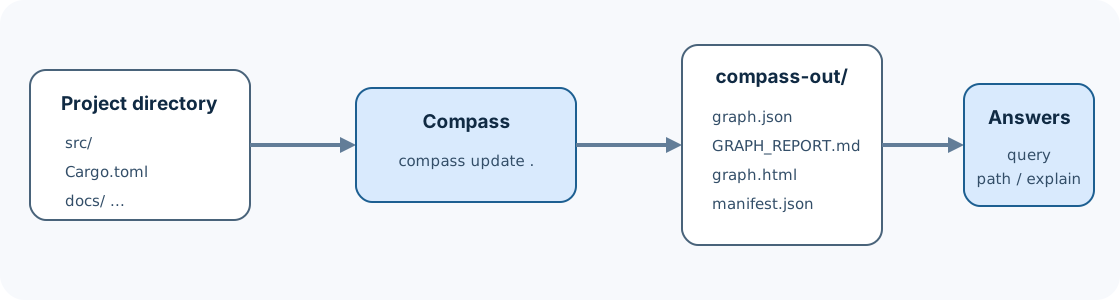
What you will produce
At the end of this guide, a project directory will contain:
your-project/
├── src/
├── ...
└── compass-out/
    ├── graph.json
    ├── GRAPH_REPORT.md
    ├── graph.html        when the graph is within the visualization limit
    └── manifest.json
You will also be able to run:
compass query "where is authentication enforced?"
compass explain AuthenticationService
compass path LoginHandler AuthenticationService
compass affected AuthenticationService --depth 3
The exact symbols in your repository will differ. The important outcome is that Compass can find and traverse relationships without rereading every source file for each question.
1. Choose an installation path
Install a macOS or Linux release
The release workflow publishes native Intel/AMD64 and Apple Silicon/ARM64
archives for macOS and Linux.
The installer downloads the latest archive, verifies its SHA-256 checksum, and
installs compass into ~/.local/bin by default:
curl --proto '=https' --tlsv1.2 -LsSf \
  https://github.com/crabbuild/compass/releases/latest/download/install.sh |
  sh
Choose another directory by setting COMPASS_INSTALL_DIR for the installer
process:
COMPASS_INSTALL_DIR="$PWD/bin" sh install.shThe macOS release is unsigned and not notarized. Read the release notes and security policy before using an installer in a controlled environment.
Install a Windows release
On Windows x64 or ARM64, the PowerShell installer downloads the matching
archive, verifies its SHA-256 checksum, and installs compass.exe into
~/.local/bin by default:
irm https://github.com/crabbuild/compass/releases/latest/download/install.ps1 | iexTo use another user-writable directory, download install.ps1 and run:
$env:COMPASS_INSTALL_DIR = "$PWD\bin"
.\install.ps1
The matching archive and .sha256 file on the
latest release remain
available for offline installation.
Build from source
The repository pins Rust 1.97.1 in rust-toolchain.toml:
git clone https://github.com/crabbuild/compass.git
cd compass
make install
make install prefers an existing ~/.cargo/bin and otherwise creates
~/.local/bin. Override the destination with
make install BINDIR="$HOME/bin".
The equivalent direct Cargo command is:
cargo install --locked --path crates/compass-cli --bin compass--locked uses the dependency versions in Cargo.lock. The resulting
executable and its test suite are native and do not launch Python.
Verify the binary
Run:
compass --version
compass --help
A successful installation prints a version and the public command surface. If
your shell reports compass: command not found, first check:
command -v compass
printf '%s\n' "$PATH"
For the default installer location, make sure ~/.local/bin is on PATH, then
open a new shell.
2. Choose a repository
You can use an existing checkout. For a low-risk first run, use a small sample repository or create one:
mkdir compass-first-project
cd compass-first-project
git init
mkdir src
Create src/app.py with a small call chain:
class PaymentGateway:
    def charge(self, amount):
        return {"approved": True, "amount": amount}


def authorize_payment(gateway, amount):
    return gateway.charge(amount)


def checkout(total):
    gateway = PaymentGateway()
    return authorize_payment(gateway, total)
Compass does not require a Git repository for a normal current-tree build, but Git is required for exact-revision history features.
3. Build the graph
From the project root, run:
compass initinit previews the files Compass will use, writes .compass/config.toml, and
performs the first build. Choose a focused scope non-interactively with:
compass init . --include src --include 'services/*/src' --exclude '**/generated/**' --yesAfter initialization, compass update is the normal “make the saved graph
match this working tree” command. It and compass watch automatically reuse
the configured scope.
For source code, Compass:
discovers files
      |
      v
detects languages and project metadata
      |
      v
parses syntax and extracts entities/relations
      |
      v
resolves cross-file references
      |
      v
analyzes and publishes compass-out/
Structural extraction does not call a model. If a project includes documents,
images, or other semantic sources, use --code-only when you explicitly want
to skip them:
compass extract . --code-onlyextract exposes detailed build controls. For most first-time codebase use,
update is the simpler entry point.
4. Confirm that the build succeeded
Check the expected files:
test -f compass-out/graph.json
test -f compass-out/GRAPH_REPORT.md
test -f compass-out/manifest.json
Then read the report:
sed -n '1,160p' compass-out/GRAPH_REPORT.mdThe report is the fastest repository-wide orientation. It summarizes graph size and points out highly connected nodes, communities, and diagnostics. A large degree does not automatically mean “most important”: generic utilities and broad containers may also become highly connected.
If graph.html exists, open it with your platform's normal browser command:
open compass-out/graph.html       # macOS
xdg-open compass-out/graph.html  # many Linux desktops
The HTML view is for exploration. graph.json remains the machine-readable
source for query commands and integrations.
5. Ask the first four questions
Compass provides several question shapes because no single ranking works for every investigation.
Find a relevant neighborhood
compass query "payment authorization"Natural-language query is local graph discovery, not a model-generated answer. Compass scores likely anchors and traverses the saved graph to return a focused subgraph.
Use a sentence that names the behavior you care about:
compass query "where are failed payments retried?"
compass query "configuration loading and validation"
compass query "HTTP request authentication"
Explain one entity
compass explain authorize_paymentexplain shows the matching node and its incoming and outgoing relationships.
Use it after a broad query gives you a symbol worth inspecting.
Trace a path
compass path checkout PaymentGatewaypath finds a known route between two graph entities. A path explains
connectivity in the extracted graph; it is not necessarily the only runtime
path or proof that every edge executes in one transaction.
Estimate change impact
compass affected authorize_payment --depth 3affected follows impact-relevant relationships to produce a review scope.
Treat its output as evidence for investigation, not a guarantee that every
returned file must change or that every possible dynamic dependency was found.
6. Read provenance instead of treating every edge equally
A result may include relationships marked with provenance such as
EXTRACTED, INFERRED, or AMBIGUOUS:
checkout
   |
   +--CALLS [EXTRACTED]--> authorize_payment
                                  |
`--USES [INFERRED]--> PaymentGateway- EXTRACTED means direct source or parser evidence created the relation.
- INFERRED means Compass resolved evidence across scopes or files.
- AMBIGUOUS means more than one interpretation remained.
Inference here is structural resolution; it does not imply an LLM invented the edge. See Provenance and confidence for the full model.
7. Run an exact query when discovery is not enough
CompassQL is a deterministic, read-only subset of openCypher:
compass query --cql \
  "MATCH (caller)-[:CALLS]->(target)
   WHERE target.label = 'authorize_payment'
   RETURN caller.id, target.id
   LIMIT 20"
Use CompassQL when you need an exact graph pattern, parameters, stable
automation, or JSON/JSONL output. Compass never guesses whether input is
CompassQL; --cql is explicit.
Before building automation, read:
8. Install the coding-assistant integration
Compass embeds its assistant skill assets in the binary:
compass installChoose a specific platform or project scope when needed:
compass install --platform codex
compass install --project --platform codex
A global installation is convenient for personal use. A project-scoped installation can be reviewed and shared with a repository. Inspect generated files before committing them, especially in a repository with existing agent instructions.
See Assistant setup for platform selection, verification, upgrades, and removal.
9. Update after a code change
Edit a source file, then run:
compass update .An incremental update should preserve unchanged extraction work and republish a
coherent artifact set. Do not edit graph.json or manifest.json by hand and
expect an update to preserve those edits.
For continuous local changes, compass watch synchronizes once at startup and
then keeps the output current with adaptive filesystem-event builds. Read
Operations before using a long-running process in CI or
an editor integration.
Common first-run problems
| Symptom | Likely cause | What to do |
|---|---|---|
compass is not found | Install directory is not on PATH | Add the directory, open a new shell, rerun command -v compass |
| Rust build selects another toolchain | Local override or old rustup state | Run rustup show, then use the pinned toolchain from rust-toolchain.toml |
| Expected files are missing | Command failed or wrote to another output directory | Read stderr, check the exit status, and look for --out in the command |
| Non-code files ask for provider configuration | Semantic sources are present | Configure a provider intentionally or use a code-only build |
| A symbol is not found | It was ignored, unsupported, generated, or labeled differently | Inspect GRAPH_REPORT.md, query by file/module, and read Troubleshooting |
graph.html is absent | Visualization was disabled or the graph exceeds its rendering limit | Query graph.json through the CLI; HTML is not required |
| Results feel too broad | Query text names a generic concept or hub | Add domain terms, explain a specific result, or use CompassQL |
What Compass does not promise
- A static graph is not a complete runtime trace.
- Dynamic dispatch, generated code, reflection, and unavailable build metadata can limit what structural analysis resolves.
- An inferred edge is evidence-backed but less direct than an extracted edge.
- A current-tree graph does not represent an old commit; use versioned history for exact revisions.
- A successful local build does not expand the officially supported release platform matrix. Follow Compatibility.
Clean up
The current-tree build is stored under compass-out/. Remove that directory
only when you intend to discard the generated graph and incremental manifest.
It can be regenerated with compass update ..
Versioned history is different: it is stored under the repository's Git common directory and may be shared by linked worktrees. Do not delete its SQLite, WAL, or operational files while Compass is running. Use history commands described in Versioned graph history.
Related pages
Next step: use Explore an unfamiliar codebase to turn your first graph into a repeatable investigation.