Use versioned graph history
Compass history stores complete, immutable graph realizations for exact Git commits in a SQLite-backed Prolly store outside normal Git history.
Use versioned graph history
Compass history stores complete, immutable graph realizations for exact Git commits in a SQLite-backed Prolly store outside normal Git history.
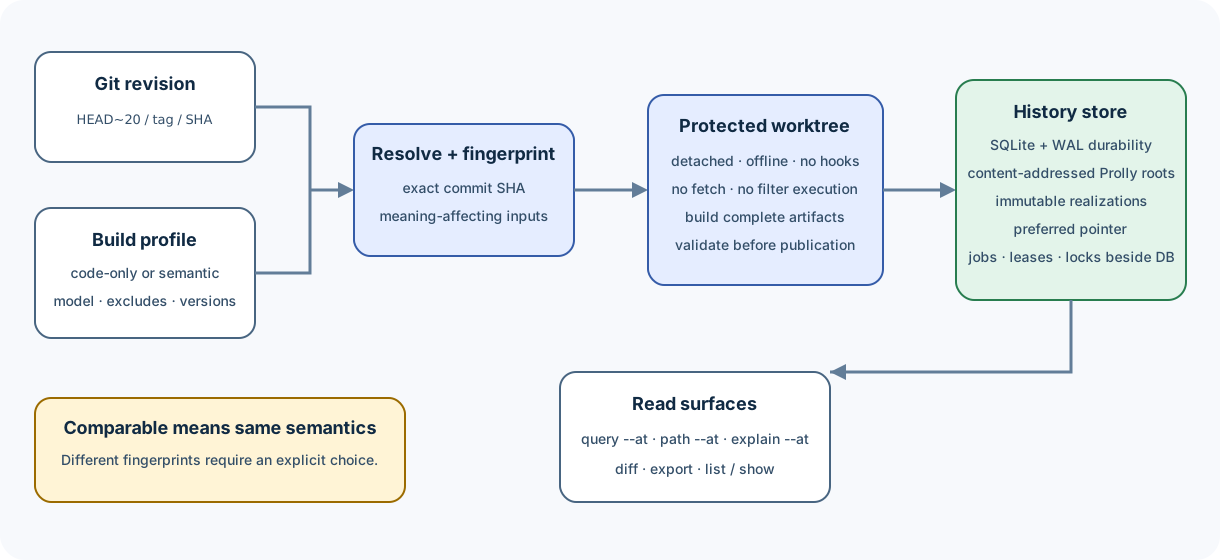
Mental model
commit SHA + extraction fingerprint
                |
                v
         immutable realization
                |
                +-- graph structure
                +-- semantic/inferred edges
                +-- hyperedges
                +-- analysis and communities
                +-- reconstruction metadata
                +-- committed source inventory
                `-- authoritative sidecars
A realization is more specific than a commit. The same commit can have a code-only realization and one or more semantic realizations with different provider/model configuration.
History graph schema networkx-node-link/v1 records automatic multigraph
promotion. History realization schema 1, store format v1, and compass/v1
named roots remain unchanged. The visible artifact-name cutover does not add a
new serialized schema. Compass does not translate dot-prefixed artifact
registry entries or import legacy cache entries; rebuild an affected revision
when it must materialize in the current layout.
Before publication, Compass binds every detected code file to its exact Git
blob ID and requires an AST completion stamp in the extraction manifest. The
canonical source-inventory.json sidecar records that proof and
distinguishes files that legitimately produced no graph records. A missing
stamp fails closed instead of publishing an apparently complete graph.
1. Inspect the command contract
Run:
compass history --help
compass diff --help
History commands include:
enable   disable   status   verify  build   rebuild
timeline change-counts diff list    show    prefer
export   cache         gc
Text output is for people. Commands that support --format json expose stable
machine-readable results.
2. Choose a repository-wide profile
Code-only
For local structural code analysis without model credentials:
compass history enable --code-onlyThe profile includes the relevant build options and installs managed
post-commit and post-merge hooks for eager enqueueing.
Semantic
Select a provider and model explicitly:
compass history enable --backend openai --model your-approved-modelProvider credentials come from the supported environment/configuration surface. They are not included in the extraction fingerprint; provider/model selection and other meaning-affecting options are.
Compass does not silently downgrade a semantic profile to code-only when credentials are missing.
What enable changes
enable:
- records the build profile for the repository;
- enables eager enqueueing;
- installs managed hooks;
- does not need to build every historical commit immediately.
Hooks capture the exact resulting commit and enqueue work durably, then return without waiting for extraction.
3. Build an exact revision
compass history build HEADUse any locally resolvable Git revision:
compass history build v1.2.0
compass history build HEAD~20
Build the entire locally reachable history from a ref with one command:
compass history build main --all --code-onlyBy default this includes commits from merged branches. To build only the first-parent lineage:
compass history build main --all --first-parentThe first request for an arbitrary, previously unseen revision is allowed to perform one bounded detached-worktree extraction. Later revisions reuse the repository-wide verified-content AST and Program cache, so unchanged files are not parsed again.
Compass resolves the ref and build profile once, orders commits
parent-before-child, and processes them sequentially. A rerun seal-checks and
skips preferred realizations that already match the selected profile. Use
compass history verify REV when you need a full record-by-record integrity
scan. Failures
are recorded per commit without stopping later commits; the final report is
still produced and the command exits 1 if any commit failed. Progress is
written to stderr, while --format json writes one stable summary object to
stdout.
The revision is resolved to a full commit SHA. Materialization runs in a detached, protected, offline worktree:
- it does not include the caller's uncommitted files;
- it honors the committed
.gitignore; - it does not inherit caller-local
.git/info/excludeor global ignore rules; - it does not fetch;
- it does not prompt for credentials;
- it does not run hooks or checkout filters that could execute external code;
- it does not smudge LFS objects or recurse into submodules.
Gitlinks and LFS pointers are reported as limitations instead of being silently expanded.
4. Inspect realizations
compass history status HEAD
compass history list HEAD
For automation:
compass history list HEAD --format jsonAfter a bulk build, omit the revision to verify all stored realizations:
compass history list --format jsonInspect one realization:
compass history show REALIZATION_IDLook for:
- exact commit;
- realization ID;
- extraction fingerprint;
- completion and validation status;
- preferred state;
- artifact and renderer metadata.
Only a validated, complete realization can become the normal preferred result.
5. Query an exact revision
Read commands accept --at:
compass query "authentication flow" --at HEAD~20
compass explain TokenVerifier --at v1.2.0
compass path ApiHandler TokenVerifier --at HEAD~20
--graph PATH and --at REV are mutually exclusive.
If the preferred realization is missing, the command can synchronously materialize it using the configured profile. This lazy behavior works even when eager generation is disabled.
For exact CompassQL:
compass query --cql \
  "MATCH (n:Function) RETURN n.id LIMIT 100" \
  --at HEAD~20 \
  --format json
Record the resolved commit and realization identity beside saved results.
6. Compare revisions
Human-readable summary:
compass diff v1.2.0 HEADExpand routine symbol churn:
compass diff v1.2.0 HEAD --allRaise the per-section display budget without expanding routine churn:
compass diff v1.2.0 HEAD --limit 50Machine-readable output:
compass diff v1.2.0 HEAD --format jsonFor bounded graph-version counts used by timeline and IDE views, both realizations must already exist:
compass history change-counts HEAD --parent HEAD~1 --format jsonThese are structural counts: source-coordinate shifts, clustering/layout metadata, and anchor-derived edge IDs are collapsed, while node and edge meaning, direction, relation, and multiplicity remain visible. Explicit NetworkX multigraph keys remain authoritative: replacing one is reported as a removal plus an addition, even when its endpoints and attributes are otherwise equal.
The Rust history engine produces one canonical structural change stream directly from the typed Prolly roots. Timeline counts, semantic diff records, and the versioned graph view all consume that classification; the viewer does not independently reinterpret storage identities. Edge reconciliation retains at most one endpoint/relation group while streaming, cancels equal projected occurrences as multisets, and deterministically pairs every remaining parallel occurrence. This keeps work proportional to changed Prolly ranges plus the largest changed parallel-edge group rather than reconstructing both graphs.
For an exhaustive record-level diff rather than a ranked semantic review, use the history subcommand:
compass history diff v1.2.0 HEAD --format jsonlIt streams deterministic header, change, and summary records using schema
compass.history.exact_diff/1. Select roots when an integration only needs
part of the realization:
compass history diff v1.2.0 HEAD \
  --root nodes \
  --root edges \
  --output exact-topology-diff.jsonl
Available roots are nodes, edges, hyperedges, analysis, metadata,
program-facts, and program-summaries. Omitted roots are not opened. Output
files are written atomically and never overwritten. Stdout is bounded; use
--output for a very large exact diff.
Self-contained interactive reviewer report:
compass diff v1.2.0 HEAD \
  --format html \
  --output semantic-diff.html
Explain one finding:
compass diff v1.2.0 HEAD --explain sd1-...The default report is ranked for PR review: likely breaks, behavior changes,
affected callers/modules, and test evidence come first. Routine symbol churn
is collapsed. Its five core concepts are contract changes, behavior changes,
dependency changes, affected consumers, and verification evidence. JSON uses
schema compass.semantic_diff.report/1; deterministic sd1-... finding IDs
make --explain and automation stable when the underlying semantic evidence
does not change. Dependency findings may include strict dependency_topology
with community IDs and bounded directed-cycle participation; absent evidence
stays absent rather than being inferred from prose. HTML embeds that complete
JSON report and provides local
search, change-type filtering, routine-churn control, expandable evidence, and
analysis-completeness indicators without requiring a server. It also shows the
exact source patch and the meaningful code-graph delta in the same report. The
graph visualization focuses on the changed subgraph; its node/edge lists and
embedded JSON remain exhaustive.
In the graph view, select a changed node, inspect its incoming and outgoing changed relationships, follow any related semantic findings, then open the exact source patch when one is available. Connected nodes and edges remain prominent while unrelated topology dims; clear the selection to restore the whole sampled graph. The inspector can also follow relationships to nodes outside the bounded visual sample, while the lists below retain every graph change.
Finding details use symbol names in call explanations, witness paths, evidence,
and before/after summaries whenever the retained snapshots provide a name.
The embedded JSON keeps the stable identities and provides the corresponding
entity_display_names lookup.
Program IR v1 provides the richest behavior evidence. For graph-only languages,
Compass can also report changed branch conditions when an exact zero-context
source hunk overlaps the changed function's recorded line span. That evidence
is exact but deliberately marked as partial control-flow coverage; unrelated
body-hash changes remain indeterminate. Rebuild older realizations with the
current Compass binary before comparing them. Static test mapping may recommend
resolved test callers, but partial or unknown evidence never claims safety
or a test gap. AI-generated summaries and hosted PR delivery are outside this
deterministic MVP.
Profile compatibility
Normal diffs require semantically comparable build profiles. If they differ, Compass explains how to build a comparable realization:
compass history build NEW_REV --profile-from OLD_REV_OR_REALIZATIONThere is no profile-mismatch override: unlike profiles do not produce a semantic or exact report. Compass checks graph-engine compatibility explicitly before comparing the complete build profiles.
7. Export a realization
Canonical graph JSON:
compass history export HEAD \
  --format graph-json \
  --output target/head-graph.json
Full Compass artifact directory:
compass history export HEAD \
  --format compass-out \
  --output target/head-compass-out
compass-out export restores authoritative non-derivable sidecars verbatim.
Derived reports and HTML are regenerated only with renderer versions recorded
in the artifact registry.
Export equivalence is semantic and canonical. JSON object or record ordering that does not affect meaning is not a contract; graph structure, attributes, multiplicity, duplicate id-less hyperedges, and authoritative bytes are.
8. Choose a preferred realization
When a commit has multiple valid realizations:
compass history prefer REV REALIZATION_IDPreference is explicit. An unreadable preferred pointer is never silently overwritten.
Recover a corrupt preferred realization only with:
compass history rebuild REV --replace-corruptThis operation uses an explicit compare-and-swap observation so a concurrent change is not blindly overwritten.
9. Understand shared storage
All linked worktrees share:
$(git rev-parse --git-common-dir)/compass/history.sqliteThe pinned SQLite adapter uses WAL mode, full synchronous durability, and a busy timeout. Operational files—jobs, leases, locks, and protected temporary worktrees—live beside the database rather than inside the Prolly values.
Safety rules:
- do not copy only
history.sqlitewhile Compass is running; - include WAL state in any live-database backup strategy;
- do not delete operational files to “unlock” a live process;
- allow Compass to create owner-only resource paths;
- use commands rather than editing Prolly keys or preferred pointers manually.
10. Garbage collection
Normal GC:
compass history gcIt retains every published realization and removes unreachable Prolly nodes plus expired operational records.
Preview pruning of non-preferred realizations:
compass history gc --prune-non-preferredApply it explicitly:
compass history gc --prune-non-preferred --yesDerived and extraction caches are disposable and have separate maintenance:
compass history cache status
compass history cache gc --max-bytes 1073741824
compass history cache gc --max-age-days 30 --yes
Cache GC is a dry run unless --yes is supplied. It never removes immutable
realizations. Semantic diff reports and historical viewer projections are
keyed by realization and engine/projection version; repeated reads therefore
avoid graph traversal.
Reported bytes and node rows are logical reclamation. GC does not promise that
the SQLite file shrinks and does not run VACUUM.
11. Disable eager generation
compass history disableDisable is idempotent. It:
- stops eager enqueueing;
- keeps the database, jobs, and existing realizations;
- does not disable explicit
buildorrebuild; - does not disable lazy
--atordiff.
Use it when hooks should stop scheduling work without discarding history.
Jobs, leases, and failures
The worker uses a durable FIFO queue and leases. A failed job does not prevent later jobs from running.
Failure handling:
| Failure | Response |
|---|---|
| Provider credentials missing | Configure the selected semantic profile or build a code-only realization explicitly |
| Provider fails mid-build | Fix provider/network and rebuild; incomplete candidate cannot publish |
| Preferred realization fails validation | Inspect with show; use explicit rebuild/recovery path |
| Profiles differ during diff | Build the missing side with --profile-from; unlike profiles are not compared |
| Live lease exists | Join/wait according to command behavior; do not delete lock files |
| Historical checkout limitation | Read the reported Gitlink/LFS/filter limitation and adjust source policy |
| Store copy is inconsistent | Restore a coherent SQLite/WAL backup; do not guess at Prolly records |
Qualification
For two commits in a clean real repository:
scripts/qualify_history_real_repo.sh /path/to/repository OLD NEWThe harness:
- builds in an isolated shared clone;
- checks deterministic JSON;
- checks reverse-symmetric diffs;
- reopens the SQLite store;
- verifies topology filtering;
- requires topology-only diff to be at least twice as fast as full diff.
This is release evidence, not a substitute for application-specific validation.
Related pages
Next step: enable a code-only profile in a disposable repository, build
HEAD, query it with --at HEAD, and inspect the resulting realization.
Compose task-oriented context
compass context builds one local evidence packet for a concrete coding task. It resolves the target before composing evidence, verifies source bytes against…
Use Compass in VS Code
The Compass extension is a local, workspace-hosted interface to the separately installed compass CLI. It works in desktop VS Code and on Remote SSH, WSL,…