Compass documentation
Compass is a native, local-first knowledge graph engine for source code and project artifacts. It discovers the entities in a project, records how they…
Compass documentation
Compass is a native, local-first knowledge graph engine for source code and project artifacts. It discovers the entities in a project, records how they relate, and gives people and tools a smaller, structured way to explore a large codebase.
Compass was inspired by Graphify, but the products now evolve independently. Compass has no Graphify runtime or test dependency. It includes Compass-native capabilities, such as CompassQL and versioned graph history, and its public contracts are defined by Compass documentation and native tests.
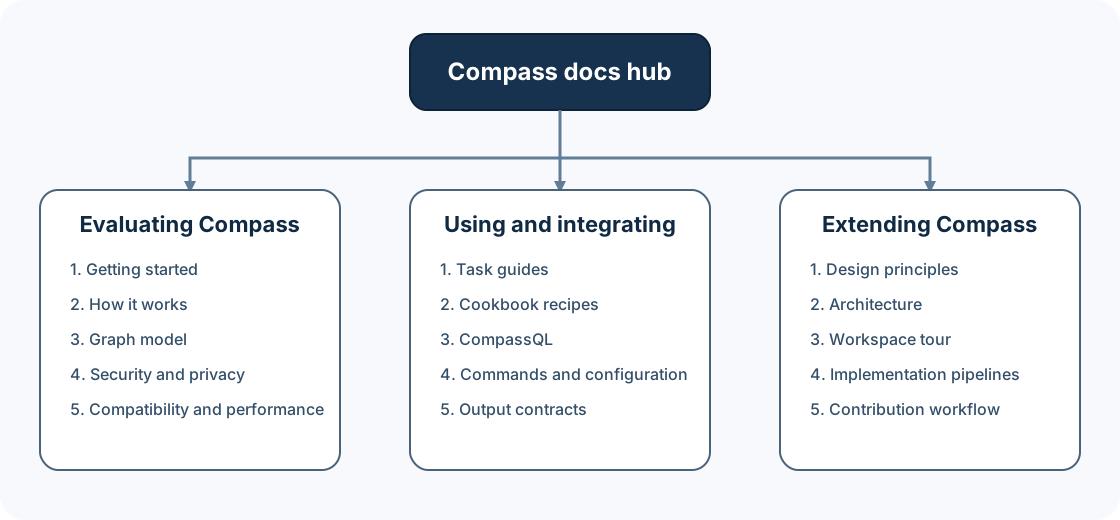
Choose your path
I am evaluating Compass
Start here if you want to understand the product before adopting it:
- Getting started — install Compass, build a graph, and answer a real question.
- How Compass works — understand the pipeline without needing graph-database experience.
- Graph model — learn what nodes, relationships, communities, and provenance mean.
- Operations — understand local execution, credentials, long-running processes, and recovery.
- Compatibility and performance — inspect the published evidence.
I use or integrate Compass
Start with Getting started, then choose the task closest to yours:
- Explore an unfamiliar codebase
- Compose task-oriented context
- Integrate Compass with other tools
- Set up a coding assistant
- Use versioned graph history
- Review pull requests in GitHub
- Operate watch, serve, hooks, and providers
- Solve a concrete problem
- Look up commands and contracts
- Check framework-route support
Documentation map
Learn the concepts
| Document | What it answers |
|---|---|
| How Compass works | How does a directory become a queryable graph? |
| Graph model | What do the entities and relationships mean? |
| Provenance | How can I judge where an edge came from? |
| CompassQL concepts | When should I use an exact structural query? |
Complete a task
| Guide | Outcome |
|---|---|
| Getting started | A working local graph and your first useful answers |
| Exploring a codebase | A repeatable architecture-reading workflow |
| Task context | A bounded, verified evidence packet for explain, modify, debug, or test work |
| Integrating Compass | Stable, machine-readable data in another tool |
| Assistant setup | A native Compass skill installed at the right scope |
| Versioned history | Immutable graphs and diffs for exact Git commits |
| GitHub PR review | Evidence-qualified reports, safe comments, and deterministic gates |
| Operations | Safe operation of long-running and optional surfaces |
Copy a recipe
The cookbook index routes to:
Look up an exact contract
| Reference | Contents |
|---|---|
| Commands | Command families, common inputs, output modes, and diagnostics |
| Configuration | Providers, environment, paths, and precedence |
| Outputs | compass-out/, graph JSON, query results, and history exports |
| Document formats | Markdown fields, limits, and discovery versus extraction |
| Framework routes | Recognized routing shapes, graph projection, and conservative boundaries |
| PR Intelligence | Canonical report, fingerprints, completeness, risk rubric, and gates |
| Compatibility | Compass contracts, hard cutovers, and portability |
| CompassQL | Canonical language and runtime contract |
| CompassQL support | Checked syntax and feature matrix |
Work on Compass internals
Implementation documents describe architecture and planned engineering work. They are not evidence that an uncompleted design has shipped.
| Document | Purpose |
|---|---|
| Universal evidence implementation | Current universal evidence pipeline, resolution order, and failure classes |
| Evidence resolution framework technical design | Target ownership, components, interfaces, and invariants for rearchitecting the resolver |
| Evidence resolution framework execution plan | Phased, commit-oriented implementation and verification plan |
| Query recall and accuracy design | Phased query-quality architecture, evidence, and rollout boundaries |
| Query implementation plans | Ordered, independently executable query-quality work plans |
How these documents are written
Compass documentation uses four document types:
Concept     explains what something means and why it exists
Guide       walks through a complete task
Cookbook    solves one concrete scenario with a short recipe
Reference   states an exact interface, option, format, or limit
This separation is deliberate. A guide should not force you through an exhaustive option table, and a reference should not hide a precise contract inside a long tutorial.
Substantial pages open directly with an overview and end with related pages and a recommended next step. Small diagrams are ASCII so they remain useful in any terminal. Larger architecture diagrams are checked-in SVG files with accessible titles and descriptions.
Canonical policy and evidence
Some topics already have a single authoritative document. The learning guides summarize and link to these; they do not replace them:
- Compatibility ledger
- Migration guide
- Performance qualification
- Security policy
- Support guide
- Contribution guide
- Code of Conduct
- CompassQL language contract
If a summary and a canonical document ever disagree, follow the canonical document and open a documentation issue.
Product status in one paragraph
Compass is a Rust workspace that ships the compass executable. Structural
code extraction and graph queries run locally and do not require Python,
embeddings, a vector database, or runtime grammar downloads. Semantic
extraction for documents and other non-code sources is optional and may contact
the provider you explicitly configure. The current release packaging and
platform guarantees are recorded in the
compatibility ledger, not inferred from what happens to
compile on one developer machine.
Related pages
Next step: follow Getting started to build and query your first graph.
Getting started with Compass
This guide takes you from a new installation to a useful answer about a codebase. It starts with structural code analysis, which runs locally and does not…
The Compass graph model
Compass stores project knowledge as entities connected by directed, attributed relationships. This page develops the model from a small example to the…